TITAN
Powerful steering with integrated targeted activation navigation optimizes simultaneous manifold selection, gating timing, targeting layers and intensity level simultaneously. This rephrasing conveys the same core idea but expresses it differently.
How TITAN Works
Combining top ideas from diverse steering approaches into an integrated unified
Improvements in TITAN involve development of gating networks with MLPs predicting activations specific to different locations; separation into distinct intensity predictions instead of a single control power; focusing on direction weights along manifold spaces; joint optimization among parts through end to end processing; and reducing leakage through selective activation.
Titan features adjustable settings that vary based on different shapes; those settings self-adjust and dynamically modify themselves depending upon activation spaces. For straight shape types it simplifies analysis down to just one dimension and disables gating. However for conical or manifold forms it uses multiple dimensions completely performing gating. As you are an authority in Natural Language Processing (NLP), please note there is terminology used here that needs careful handling. Titan adjusts configurable settings according to varying geometry; these adapt automatically and change configuration autonomously according to activated regions. Analysis reduces to single dimension for straight form and gates deactivate; cones and manifolds use more dimensions fully executing gating tasks. You are now skilled at processing natural language. Please consider this sample sentence and translate it into English. Note that there
When to Use TITAN
- Maximum Control: When you want the most sophisticated steering possible
- Complex Behaviors: For behaviors that require conditional, multi-directional steering
- Input-dependent Intensity: When different inputs need different steering strengths
- Unknown Geometry: When you're not sure what geometry your data has (TITAN adapts)
- Production Deployment: When you need robust steering that handles edge cases
- Research: When exploring the limits of representation engineering
Also consider that Titan requires additional parameters and therefore takes more time for training compared to simpler methods. Generally speaking, Linear Steering CAEs or Hyperplanes perform better on simple tasks.
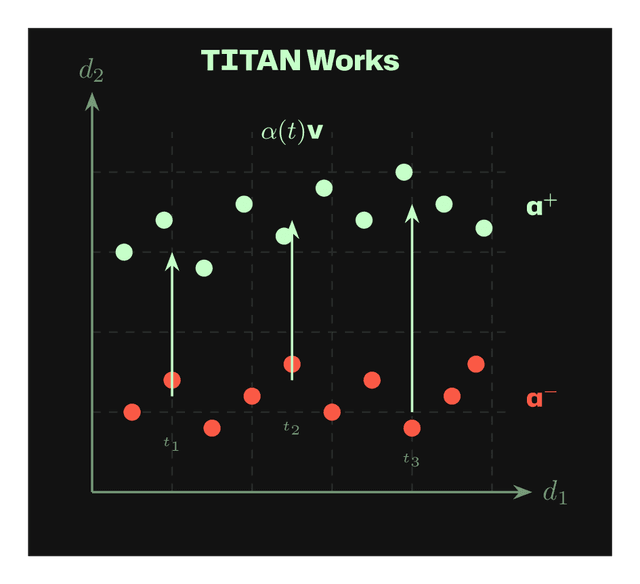
Works: Token-specific steering α(t)v adapts intensity at each position (t₁, t₂, t₃).
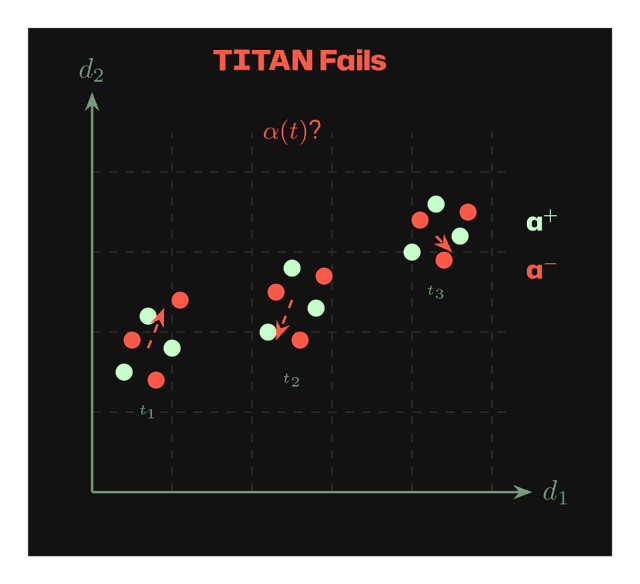
Fails: When activations at each token position are mixed, adaptive α(t) cannot find consistent directions.
CLI Examples
python -m wisent.cli tasks safety_pairs.json --from-json --steering-mode --steering-method TITAN --layer 15 --save-steering-vector safety_titan.pt
python -m wisent.cli tasks refusal_pairs.json --from-json --steering-mode --steering-method TITAN --layer 15 --titan-adapt-to-geometry --titan-auto-num-directions --save-steering-vector refusal_titan.pt
python -m wisent.cli tasks honesty_pairs.json --from-json --steering-mode --steering-method TITAN --layer 15 --titan-num-directions 5 --titan-optimization-steps 300 --titan-learning-rate 0.003 --save-steering-vector honesty_titan.pt
python -m wisent.cli tasks bias_pairs.json --from-json --steering-mode --steering-method TITAN --layer 15 --titan-behavior-weight 1.5 --titan-retain-weight 0.3 --titan-sparse-weight 0.1 --titan-smooth-weight 0.05 --save-steering-vector bias_titan.pt
python -m wisent.cli tasks complex_pairs.json --from-json --steering-mode --steering-method TITAN --titan-sensor-layer 20 --titan-steering-layers 15,16,17,18,19 --titan-max-alpha 4.0 --save-steering-vector complex_titan.pt
Parameters
Manifold Configuration
Layer Configuration
Network Architecture
Training Parameters
Loss Weights
Constraints
Geometry Adaptation
For the complete implementation of the TITAN steering method in Wisent, see:

Stay in the loop. Never miss out.
Subscribe to our newsletter and unlock Wisent insights.