CAA
By simply averaging activation patterns of both positive and negative instances to form control vectors which are then summed into model activations at inference time. To average activation patterns for positive and negative cases results in forming control vectors which sum
How CAA Works
CAA training uses pairs of positive and negative examples to run an AI model; it captures internal activation levels at a certain layer; averaging those activations across all positives and negatives produces vectors; finally subtraction yields a "guidance vector" that reflects mathematically the distinction between good and poor performance. CCA training works with sets of positive and negative examples and runs these through the AI model. Capturing internal activations from a particular layer follows next. Averaging activations for all positives and negatives results in vectors; finally subtraction creates a guidance vector which is based on mathematics regarding distinctions among high
During inference, this steering vector is directly concatenated with activations from the corresponding layer; it gets multiplied by a strength factor and is especially targeted for the penultimate element of a sequence to guide future generation by the AI. Optionally such vector may also use L2 normalization to regulate its size and after learning process ends this resulting tensor file becomes straightforward to load and reuse immediately without further fine tuning.
Conceptually CAA is straightforward; it averages neuronal patterns and adds or subtracts them during inference and then combines them into a specific layer.
When to Use CAA
CAA works best when positive and negative activations are linearly separable. It computes a single steering vector that points from negative to positive class means.
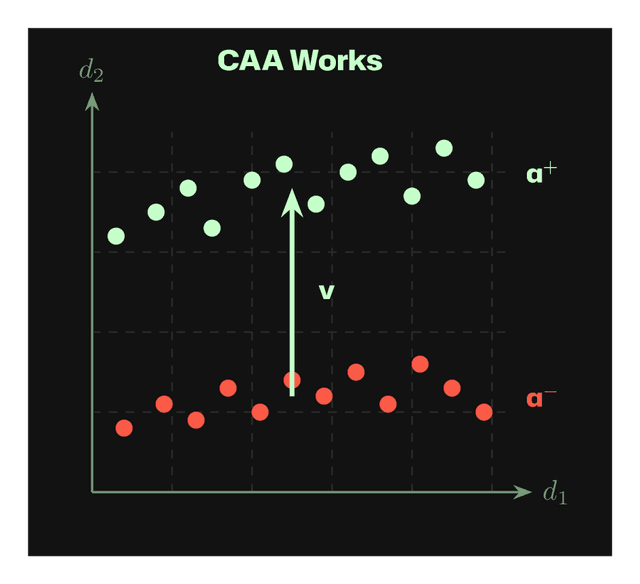
Works: Linear separation allows the steering vector v to move activations from a⁻ toward a⁺.
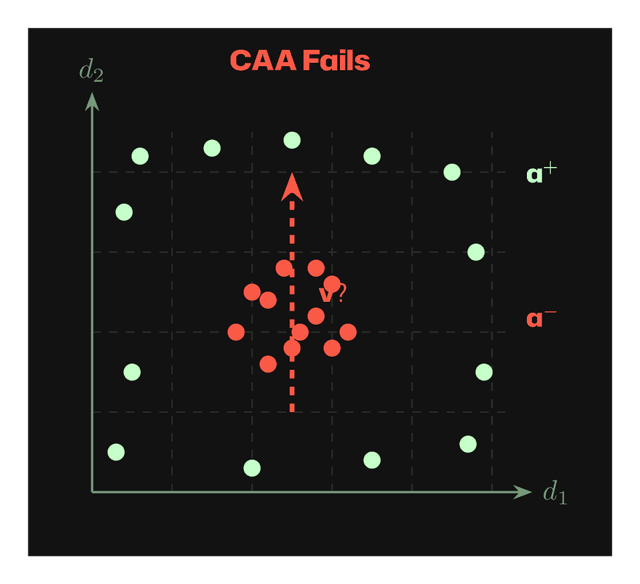
Fails: Nonlinear distributions (e.g., a⁻ surrounded by a⁺) cannot be separated by a single vector.
CLI Examples
python -m wisent.cli tasks honesty_pairs.json --from-json --steering-mode --steering-method CAA --layer 15 --save-steering-vector honesty_caa.pt
python -m wisent.cli tasks politeness_pairs.json --from-json --steering-mode --steering-method CAA --layer 12 --max-new-tokens 50 --device cuda --save-steering-vector politeness_caa.pt --limit 100
python -m wisent.cli tasks test_questions.json --from-json --steering-mode --steering-method CAA --layer 15 --load-steering-vector honesty_caa.pt --steering-strength 1.5
python -m wisent.cli tasks safety_pairs.json --from-json --steering-mode --steering-method CAA --layer 18 --normalization l2 --show-memory-usage --allow-small-dataset
Parameters
CAA Specific Parameters
Token Steering Parameters
For the complete implementation of the CAA steering method in Wisent, see:

Stay in the loop. Never miss out.
Subscribe to our newsletter and unlock Wisent insights.